

 Preview unavailable. Open the source below.
- Works with
- Browser / upload
- How it connects
- Upload & export
- Availability
- AvailableSelf-serve plans are available. The account workflow and generation mode determine applicable limits.
Is it right
for your store?
Fit matters more than a feature count.
A relevant shortlist option for apparel brands that want to explore on-model imagery from existing product photos. Evaluate garment fidelity before scaling: compare seams, prints, logos and fit against the original. Treat catalog production and open-ended editorial generation as different credit workloads.
Research checked · Based on published sourcesA good fit for
- Apparel merchants exploring on-model catalog imagery
- Teams with clear garment source images and a review process
- Creative teams producing variations before store upload
Look carefully if
- Accepting every generated garment detail without review
- Assuming all generation modes are unlimited
- Expecting a verified native store publishing connection
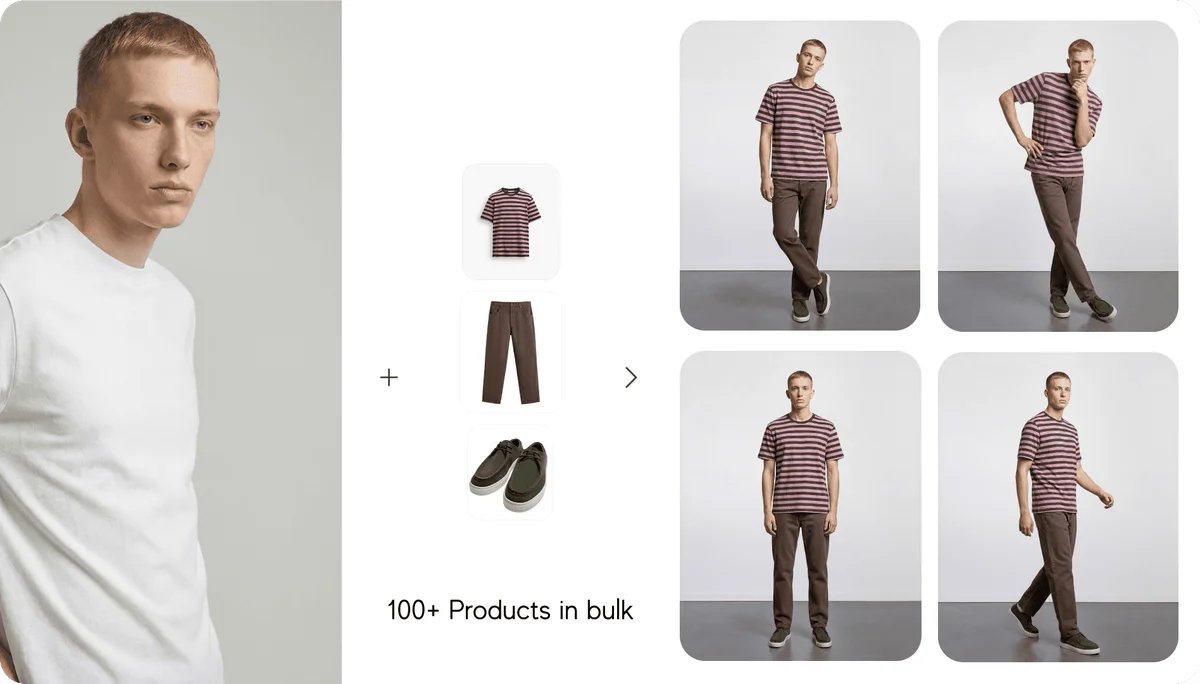
Caimera offers AI fashion and product photography workflows, including on-model catalog images, editorial scenes and image editing. Merchants can supply garment images, select a model and setting, then review generated variations for their store.
Documented strengths
- Fashion-focused model, pose and scene controls
- A vendor-described bulk workflow for garment folders
- Image editing and upscaling alongside generation
What it
can do.
Coverage and conditions, side by side.
Product imagery
Generate model-and-garment combinations with chosen poses and backgrounds; inspect product fidelity.
Required plan Catalog workflow and available credits
Source : Product imageryBatch processing
The vendor describes folder-based garment batches and reuse of job settings. Confirm plan access and batch limits.
Required plan Confirm bulk entitlement with vendor
Source : Batch processingImage editing
Editing is available within the creative workflow; costs depend on the chosen model and resolution.
Source : Image editingUpscaling
Paid-plan upscalers have different output and credit rules.
Required plan Paid plan; check the selected upscaler
Source : UpscalingStore catalog connection
The reviewed sources did not establish native store synchronization or product-page write-back.
Source : Store catalog connectionWhat the
price buys.
Starting prices are only part of the bill.
Mini lists 120 monthly credits. Its advertised allowances of up to 120 editorial images or 12 catalog images represent alternative uses of the same balance. Free signup includes 20 one-time credits. Dollar currency was not explicitly identified in the reviewed page; confirm checkout currency.
- Charged by
- User + generation credits
- Commitment
- Monthly; annual billing also offered
- Required plan
- Mini for entry paid use; confirm workflow entitlement
Checked Oct 5, 2026. Usage, add-ons and taxes may change the total.
Plans and
practical questions.
Worked examples are planning scenarios, not measured product results.
Where it
fits in.
Check the connection your workflow needs.
Browser / upload
Upload source product images and export selected results for your storefront. A native catalog write-back connection was not confirmed.
Browser-based tools can support a Shopify workflow without a native Shopify integration. Connection methods reflect the documented workflow.
The details
that matter.
Limits are part of choosing well.
Generation can alter product details. ToolClue has not tested garment accuracy, acceptance rates or cost per usable export.
Unlimited generation is restricted to particular models, resolutions and plans. Catalog, higher-resolution and other actions can still use credits.
Native Shopify or WooCommerce catalog synchronization was not verified. Plan for manual review, export and upload unless the vendor confirms another route.
The referral destination opens Caimera’s sign-in page. Review plan terms and output permissions before purchasing.
This profile is based on published sources. No independent test record is published for this profile. “Not confirmed” means the available evidence has not established the claim.
- Fashion and product photography overviewwww.caimera.ai
- Monthly plans and included creditswww.caimera.ai
- Flatlay-to-catalog and bulk workflowwww.caimera.ai
- Credit usage, unlimited scopes and upscalershelp.caimera.ai
Material changes can happen between reviews. Confirm current capabilities, plans and terms with the vendor.
Other tools to consider.

Compose product scenes with more creative control
US$10/month
From product cleanup to a connected Shopify catalog
A$19.99/month (Australia, web)

Product scenes and batch photo editing in a browser
$10/month for Pro